If you followed wrong procedure to use CGDI MB to write the elv and sync to eis (because some eis are dealer eis) It's simple job to follow the below steps.
Steps:
use the eis dump to write the elv !! dont touch the eis !! just read it and compute pass!! and load in the elv function and write the elv with dump from eis !!
just insert a working key to eis and wait few seconds to activate the elv !!!
Question: ok, but it worked for me.
In their approach, but you have to make the ELV virgin and not just repair. but that is not a problem with cgdi. But thanks for the hint. How do I recognize a dealer EIS? what is the difference?
Answer:
down in the litte box that confirm the status of eis it shows dealer eis !! if is biffed that mean is dealer eis and you cannot rewrite back
and elv is simple to do
if is used elv
just calculate erase pass
and erase it
after that load the eis dump with pass
and write the elv
after you have succes writed elv
to activate elv just insert a working key in eis and wait few seconds to hear the elv motor
thats it all!!
OME MORE TIME I SAY "DONT ERASE EIS TO PROGRAM ELV USED OR NEW " just read the eis calculate pass and write the elv with the dump from eis !!
ITS VERY SIMPLE !!!
Thanks!
Source:
http://blog.obdexpress.co.uk/2019/01/11/how-to-use-cgdi-mb-to-write-the-elv-and-sync-to-eis/
CGDI Prog Benz
Showing posts with label CGDI Prog. Show all posts
Showing posts with label CGDI Prog. Show all posts
Thursday, January 10, 2019

Monday, December 24, 2018
BENZ W639 New Key Programming With CG-Pro And CG-MB
Topic:2004 W639 all keys lostTwo option:
1.Used VVDI PROG to get dump and VVDI MB for key program.
2.CG-Pro and CG-MB can do the same job.
The second way can save more money .It’s a cheaper way
1.Used VVDI PROG to get dump and VVDI MB for key program.
2.CG-Pro and CG-MB can do the same job.
The second way can save more money .It’s a cheaper way
Instruction: W639 new key programming with CG-Pro and CG-MB

Take down lock,check the number

EIS related chip

Open CG-Pro,enter into the related operation interface

View wiring diagram

Physical operation

Read data successfully and save it

OpenCG-MB,Load the data just read by CG-Pro

Load EIS data successfully,show the password directly

Save EIS data,please default the file name

Go to “GenerateEE”,Load the EIS data just saved

Load successfully,please check whether all information is correct

Click“Generate key file”,please wait…

Key file generated successfully,please save data file

Go to “Read key”

Insert new key into CG-MB

Click read,show related information

Click write,please note the prompt,Click ok

Choose一unused key data file,click and open it

Write success,put EIS back,then just get on car to learning it
Wednesday, December 19, 2018
(Solved)CGDI BMW "21E1 FEM BDC version does not support "
Some BMW F series with FEM / BDC Immobilizer system has higher or lower firmware version, the user will get message "21E1 FEM BDC version does not support, please upgrade FEM BDC first " when using CGDI BMW to program key via OBD. then many users tend to think their FEM/BDC is not supported by CGDI BMW and miss the chance to earn money. In the following parts, I will show you how to solve this problem.
Solution provided by obdexpress.co.uk engineer:
1. Ensure the BMW has correct voltage, plug CGDI BMW to the OBD2 port of to BMW.

2. Click on "FEM / BDC key Match", you may get message "FEM/BDC version is not supported, please upgrade FEM/BDC first".


3. Turn on the ignition switch, open the door, click on "F /G series program".

Choose "2 . FEM _Body", then "Begin Program".


4. Turn on the ignition switch, open the door, click on "F /G series coding".

Choose "2 . FEM _Body", then "Coding".

5.Get prompt that all are fine, follow the on-screen message to operate.


Done.
CGDI BMW programmer tech support by http://blog.obdexpress.co.uk/2018/12/20/cgdi-bmw-21e1-fem-bdc-version-does-not-support-solution/
Tuesday, October 10, 2017
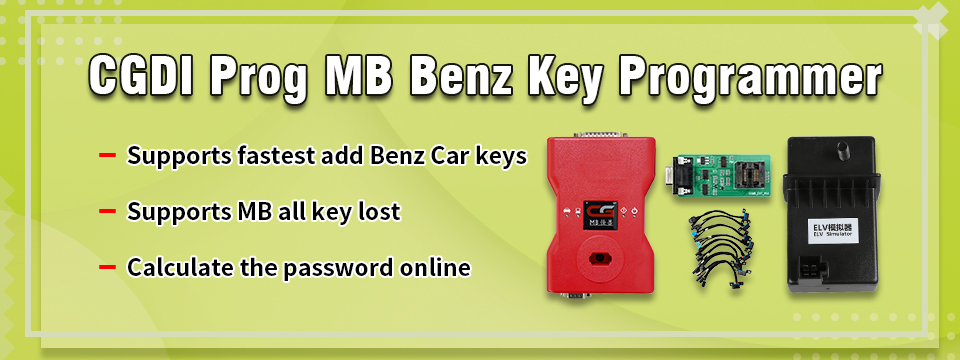
CGDI Prog MB Benz Key Programmer
CGDI Prog MB Benz Key Programmer Support Fastest Add Keys and All Keys Lost


Top 3 Reasons to get CGDI Prog MB Key Programmer:
1.Supports fastest add Benz Car keys: collection time 1'50s, password calculation time 40s, 99% get password for one time calculator, it is the fastest key programming tool to calculate the password at present.
2.Supports MB all key lost, including 211,209,204,207,212,166,246,197,172,164 +, 216 etc.
3.CGDI Prog MB can calculate the password twice free each day.
2017 CGDI Prog MB Key Programmer Description:
1. Function:
Able to add keys on Mercedes Benz and program a new key when all keys are lost.
Add new Mercedes Benz keys: Data acquisition for 1 minute 50 seconds, pin code for 40 seconds and 99% success.
Program a new key to the following models when all keys are lost: 211, 209,204, 207, 212, 166,246,197,172,164+, 216 etc.
2. Workable Benz Car Model:
Mercedes-Benz A series (2004 -)
Mercedes-Benz B series (2005-)
Mercedes-Benz C Series (2001 - , including 210)
Mercedes-Benz E Series (2001-, including 203)
Mercedes-Benz CL series (2001-)
Mercedes-Benz GLK (2004-)
Mercedes-Benz ML series (2003 -)
Mercedes-Benz R series (2003 -)
Mercedes-Benz G series (2003 -)
Mercedes-Benz S Series (2001 -, including 220)
Mercedes-Benz SLK (2003- )
Mercedes-Benz SLS (2004 -)
Mercedes-Benz Vito (2003-)
Mercedes-Benz Sprinter (2003 -)
Mercedes-Benz Vito (2003 -)
3. EIS/EZS Function:
1). Can read EIS data via OBD, no need to distinguish the EIS/EZS model.
2). Can display the key status and directly disable the key position.
3). Can display EIS Number, can distinguish the Benz model
4). Can display EIS status.
5). Automatically identify EIS model.
6). Automatically identify CAN protocol
4. Programming Key Features:
1). Automatically identify the basic key information (including how many times you used SSID)
2). Can directly read pin code of BE keys via infrared, can erase BE keys.
3). NEC adapter can write the original Benz smart key and common key.
4). Can write the Benz original key via infrared.
5). Can restore the data of key and EIS with the key password.
5. Generate the Key Data:
1) Can generate the key data of HC05/908/912/9S12/NEC EIS/EZS
2) Time: 26 seconds
3) Format: 11/ 41/51 (41 format is smart key data)
6. Infrared Key Function:
1) Can directly read key pin code via infrared on parts of 209/211/220/215 EIS.
2)Can read/write EIS via infrared.
Packing List:
1set CGDI Prog MB Benz Car Key Programmer
Able to add keys on Mercedes Benz and program a new key when all keys are lost.
Add new Mercedes Benz keys: Data acquisition for 1 minute 50 seconds, pin code for 40 seconds and 99% success.
Program a new key to the following models when all keys are lost: 211, 209,204, 207, 212, 166,246,197,172,164+, 216 etc.
2. Workable Benz Car Model:
Mercedes-Benz A series (2004 -)
Mercedes-Benz B series (2005-)
Mercedes-Benz C Series (2001 - , including 210)
Mercedes-Benz E Series (2001-, including 203)
Mercedes-Benz CL series (2001-)
Mercedes-Benz GLK (2004-)
Mercedes-Benz ML series (2003 -)
Mercedes-Benz R series (2003 -)
Mercedes-Benz G series (2003 -)
Mercedes-Benz S Series (2001 -, including 220)
Mercedes-Benz SLK (2003- )
Mercedes-Benz SLS (2004 -)
Mercedes-Benz Vito (2003-)
Mercedes-Benz Sprinter (2003 -)
Mercedes-Benz Vito (2003 -)
3. EIS/EZS Function:
1). Can read EIS data via OBD, no need to distinguish the EIS/EZS model.
2). Can display the key status and directly disable the key position.
3). Can display EIS Number, can distinguish the Benz model
4). Can display EIS status.
5). Automatically identify EIS model.
6). Automatically identify CAN protocol
4. Programming Key Features:
1). Automatically identify the basic key information (including how many times you used SSID)
2). Can directly read pin code of BE keys via infrared, can erase BE keys.
3). NEC adapter can write the original Benz smart key and common key.
4). Can write the Benz original key via infrared.
5). Can restore the data of key and EIS with the key password.
5. Generate the Key Data:
1) Can generate the key data of HC05/908/912/9S12/NEC EIS/EZS
2) Time: 26 seconds
3) Format: 11/ 41/51 (41 format is smart key data)
6. Infrared Key Function:
1) Can directly read key pin code via infrared on parts of 209/211/220/215 EIS.
2)Can read/write EIS via infrared.
Packing List:
1set CGDI Prog MB Benz Car Key Programmer


http://www.mbstartool.com/wholesale/cgdi-pro-key-programmer-benz-all-key-lost.html
Subscribe to:
Posts (Atom)
How to assemble CG MB FBS3 BGA KeylessGo Key & VVDI Benz smart key shell?
Both CG MB FBS3 BGA KeylessGo Key and Xhorse VVDI Benz smart key shell 3 button share the same assembly process. Open the battery cove...

-
Topic: How to use CG PRO do odometer reset for 2010 BMW X1 Here you are: Car Model:BMW X1 (imported version) Year: 2010 model Instrume...
-
I have a Mercedes w212 year 2012, need to correct mileage to EIS with CGDI MB , can anybody explain me how to correct mileage to EIS? How ...
-
BMW DME ISN code reader tools advice: AT-200 + CGDI BMW AT200 Can read BMW DME ISN code by OBD for MSV90 MSD85 MSD87 MSD85.2 MSD87.2, ...


